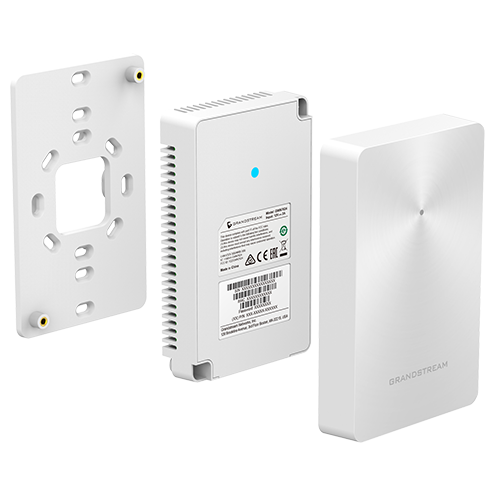
Grandstream GWN7624 In-Wall WiFi 5 Access Point
An in-wall WiFi 5 access point with one uplink and three Gigabit LAN ports, including two PoE-output ports for room endpoints.
verified Key Technical Highlights
- check_circle WiFi standard: 802.11ac; dual band
- check_circle 5 GHz radio: 4×4:4 MU-MIMO; PHY up to 1,733 Mbps
- check_circle Ethernet ports: 1 uplink + 3 Gigabit LAN ports
- check_circle PoE output: 2 PSE ports; up to 6 W per port
- check_circle Power input: IEEE 802.3af/at PoE
Overview
Imagine planning guest-room connectivity for a hotel floor: travelers work at the desk, stream content on the room TV, and place calls from a bedside or desk IP phone. Wireless signal is only half the picture—wall box location, upstream power, and local wired ports shape the actual room build. The GWN7624 is an 802.11ac Wave-2 in-wall access point to evaluate after surveying representative rooms and floor switches.
Evaluate coverage where guests actually sit and work
Hallway signal readings rarely reflect desk or bedside performance once fire doors are closed. Survey sample rooms across different wall types, bathroom shafts, and furniture layouts, checking adjacent rooms at the same time. An existing wall jack marks where copper enters the room—not automatically a clean RF mounting spot.
The GWN7624 operates on WiFi 5 (802.11ac Wave 2). Match that standard to actual room applications and guest devices; published aggregate radio rates and client limits are reference figures to read alongside in-room testing.
One PoE uplink, three room LAN ports, and input-dependent PSE budgets
The rear Gigabit uplink port receives PoE from the floor switch while three bottom Gigabit LAN ports feed wired endpoints inside the room. That lets a single horizontal cable serve multiple room devices, though physical ports alone do not enable IPTV or telephony—each endpoint still needs compatible provisioning and upstream services.
LAN2 and LAN3 provide PoE-out up to 6 W per port. Per Grandstream installation documentation, an 802.3at (PoE+) input allows both LAN2 and LAN3 to supply PSE power, whereas an 802.3af (PoE) input enables PSE on LAN3 only. Check the peak wattage of the exact IP phone or powered device against that 6 W ceiling; guest-room TVs use separate mains power and still require protocol checks.
Room ports depend on VLAN and multicast policies from the floor switch
Guest WiFi, room VoIP phones, and IPTV set-top boxes typically belong on separate VLANs with distinct security policies. AP port mapping, floor switch trunks, and gateway rules have to match; IPTV deployments may also require multicast handling checks. For room IP phones, validate PBX registration, dial plans, and power draw before freezing the bill of materials.
Configured properly, guests gain both room WiFi and a wired desk port while hotel IT keeps a clean port-to-room mapping table for troubleshooting. Auditing existing cabling, endpoints, and management tools clarifies what can be reused versus upgraded.
Pilot a sample cluster of rooms before floor-wide rollout
Mount pilot units according to the wall-box guide with the front face unobstructed and enough bottom clearance for patch cords without sharp bends. Avoid hiding the unit behind metal TV brackets or inside closed cabinetry where heat and attenuation build up.
Test WiFi alongside wired TV and phone endpoints at the desk, bed, and doorway under realistic load, comparing in-room wall plates against corridor AP adjustments on equal criteria. Include PoE+ switch budgets, wall boxes, patch cords, room access windows, and commissioning labor in the project estimate before finalizing AP counts.
Selection boundaries and acceptance checklist
When this model fits
- Guest rooms, dormitories, or private offices need WiFi 5 plus local Gigabit LAN ports at surveyed wall boxes.
- Upstream PoE/PoE+ input and the 6 W per-port PSE limit match the actual room phone or wired endpoint.
When to choose another approach
- The specification requires WiFi 6/7 or room endpoints that draw more than 6 W over PoE-out.
- Usable wall-box cabling is unavailable, or the deployment requires a standalone WAN router.
Verify before ordering
- Floor switch PoE vs PoE+ mode, exact PD wattage on LAN2/LAN3, and IPTV/PBX VLAN requirements.
- Wall-box depth, furniture clearance behind desks or TVs, and room-by-room installation access.
Site acceptance checks
- Test WiFi at the desk, bed, and neighboring rooms with doors closed as in normal occupancy.
- Verify LAN1/2/3 link state and PSE behavior under the actual PoE/PoE+ input mode with all room devices active.
- Confirm wired IPTV/VoIP operation, guest network isolation, and port-to-room handover records.
Share a typical room layout, photos of existing wall outlets, and the TV or IP phone models to connect so VinaTech Telecom can review PoE sizing and a sample-room pilot.
Technical Specifications
| PoE output | 2 PSE ports; up to 6 W per port |
| 5 GHz radio | 4×4:4 MU-MIMO; PHY up to 1,733 Mbps |
| Power input | IEEE 802.3af/at PoE |
| WiFi standard | 802.11ac; dual band |
| Ethernet ports | 1 uplink + 3 Gigabit LAN ports |
Documents
Product questions and answers
How much PoE-out power can the GWN7624 supply to a room IP phone?
LAN2 and LAN3 support up to 6 W PSE each when the GWN7624 receives 802.3at PoE+ input; with 802.3af PoE input, only LAN3 supplies PSE power. Always check the maximum power draw of the target IP phone model against the 6 W limit.
Can the GWN7624 be mounted directly behind a wall-mounted hotel TV?
Metal TV mounts and display panels can attenuate wireless signal, and tight clearances can pinch bottom-exiting patch cords. Test placement in a sample room with doors closed before committing to a full floor layout.
Can the three downlink LAN ports carry separate VLANs for IPTV, VoIP, and guest laptops?
Yes, when VLAN tagging on the GWN7624 is matched with trunk configuration on the floor switch and upstream routing, PBX, and IPTV policies.