Watch service video with chapters · Vietnamese →

Office Wi-Fi and LAN installation
Identify the bottleneck, plan Wi-Fi and LAN for actual work, clarify the investment and test before handover.
Điểm nổi bật
- check_circle Investigate the task and its bottleneck
- check_circle Clarify reuse, upgrades and costs
- check_circle Organize connections and access policies
- check_circle Test the tasks and explain operation before handover
Full Wi-Fi signal, but the meeting still freezes?
A colleague is presenting, while others ask them to repeat a sentence because the audio cuts out. Moving seats or restarting the access point helps briefly, but the interruption returns when the office gets busy. The important outcome is keeping work moving, rather than simply seeing a connected icon.
VinaTech Telecom's office Wi-Fi and computer network installation service starts with the tasks your team needs to complete: online meetings, file transfers, shared data, printing and additional workstations. We review the existing system before discussing Wi-Fi placement, LAN connections and the implementation scope. Each proposed item needs a reason for the investment.
Understand the work before selecting equipment
A meeting room needs to serve the people and devices present during meetings. Workstations need access to the resources their users are allowed to use. An office move also needs an agreed date for bringing the new space into use. The first discussion should establish:
- The interrupted task: broken meeting audio, slow file transfers, unavailable printers or poor connectivity in one area.
- Location and timing: where it occurs, and whether it happens only when the office is busy.
- Devices and applications: laptops, phones, printers and data servers; which tasks need to be tested again.
- Existing equipment and plans: access points, switches, cabling, Internet service, layout and planned workstations.
Locate the bottleneck before buying more
Signal bars describe only part of the connection. A frozen meeting can also involve cabling, network equipment, Internet access, the user's device or the application. Adding an access point or increasing the Internet package before narrowing down the cause may leave the original problem unresolved.
Where practical, compare the same task on the same laptop, at the affected location, over Wi-Fi and a wired connection. If only Wi-Fi has problems, investigate the wireless link and the access point's network connection. If both have problems, examine their shared path and the application. This comparison narrows the investigation; it does not immediately prove that a device has failed. Changes to a working network should be planned and performed by the responsible technical team.
Each network component must support a specific task
Your team should be able to understand what a device will do, where it will be installed and how it connects to the rest of the system. An equipment list alone cannot answer those questions. The Wi-Fi and LAN proposal should connect the experience at each workstation with the infrastructure behind it.
Plan Wi-Fi around actual locations and demand
Review occupied meeting rooms, desks behind partitions and routes between work areas. Access point placement, obstacles, channels and simultaneously active devices need to be considered together. Coverage and the ability to serve work are separate checks. Cisco's WLAN survey guidance considers both coverage and capacity in meeting rooms.
An access point also needs an adequate connection back to the network and power for its selected configuration. The AP count follows the layout, demand and equipment capability, rather than employee count alone. If calls need to continue while users move, test that requirement on their actual devices. Apple's roaming documentation explains the role of client support. An advertised AP feature does not replace an application test.
Organize the LAN for use and troubleshooting
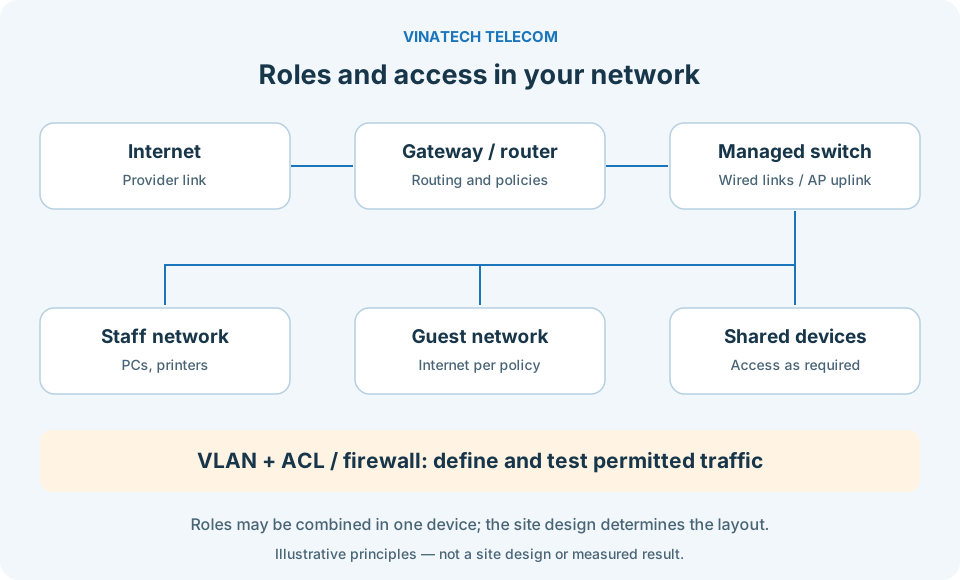
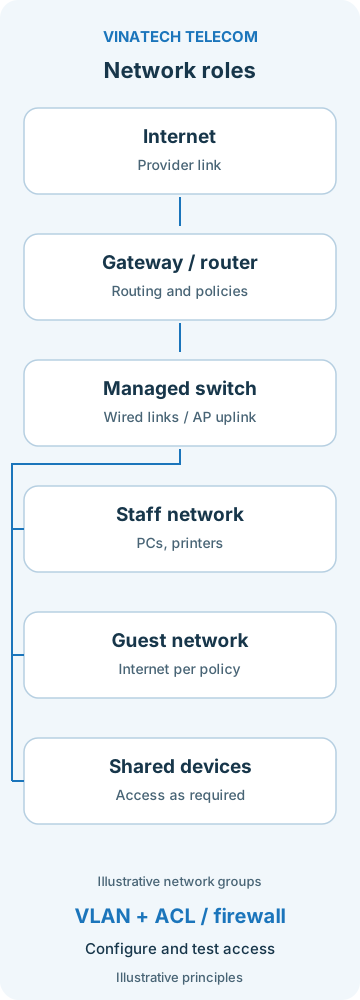
Fixed computers, printers, data servers and access points need clearly organized connections. Cabling, connectors, switch ports, power and labels belong in the same plan. When investigating a fault or adding a workstation, the responsible person should be able to trace a connection.
Router, switch and AP roles follow scale, load and operational needs. Not every office needs three separate equipment tiers; Cisco's LAN design guide covers small networks as well as larger deployments. Cable and power choices must also account for the installation route, connected equipment and requirements.
Useful guest access and clear internal permissions
Visitors need Internet access. Employees need printers and data according to their assigned rights. Establish which network each group uses, which resources are permitted and which connections must be blocked. VLAN segmentation needs access policies on capable equipment, followed by tests of allowed and prohibited paths. Ubiquiti's guest Wi-Fi guidance describes network isolation and control options. These functions must be configured; they are not a guarantee that all security risks have been removed.
Make the investment and implementation scope clear
Not every component needs replacing. Review existing equipment, cables and cabinets before deciding what to upgrade. Retaining components that meet the requirements focuses spending on the actual issue. A replacement needs an explanation of the existing limitation and how the change will be verified.
Separate reuse, additions and upgrades
- Adjust the existing system: review AP positions, configuration, connections and access rights, within the capabilities of the installed equipment.
- Add capacity where needed: add cabling, ports or access points when locations and actual demand justify them.
- Upgrade a limiting component: replace an identified constraint, explaining dependencies and future expansion.
The quotation should define equipment, materials, installation, configuration, tests and handover documents. Where management software, licences or recurring services apply, identify the items and renewal cycle. Evaluate the investment against the tasks it must support and how the system will be operated; do not assume a savings figure without data.
Agree the work plan before installation
VinaTech Telecom and the responsible contact agree on work areas, scheduling, changes that can interrupt connections and coordination. On an active system, identify the cutover scope, configurations to retain and a return plan if testing is unsuccessful. Dependencies on the premises, equipment and Internet provider are discussed in the proposal.
Backup Internet, Wi-Fi roaming, specialist cable tests and expansion requirements are included when needed, with defined equipment and criteria. Warranty, support scope and response arrangements are set out in the quotation or service agreement so that expectations are clear before proceeding.
Test the original tasks, then hand over for daily use
The opening concern was an interrupted meeting. Testing should return to that room and that task. A Wi-Fi icon or an isolated speed test does not replace the user's experience. Agree the criteria before installation, test representative devices and record the conditions.
- Meeting room: run a meeting, check audio, video and screen sharing at the required locations, and record interruptions during the test.
- Shared data: open and transfer representative files between permitted devices; distinguish internal tasks from Internet-dependent tasks.
- Printing: locate and use printers from the relevant user group; check addressing and access rights if needed.
- Guest network: verify that guests can use the Internet and cannot access the resources designated as prohibited.
- Load or movement: where required, test the agreed device count, movement route and application; document remaining dependencies.
Handover covers the connection diagram, labels, retained configuration, administrative access and the results tested within scope. The responsible person is shown how to operate the system, recognize a fault and prepare information for support. Administrative credentials are delivered to the designated contact through an agreed method.
Your team should understand what the network is designed to support, which part the investment addresses and who is responsible for follow-up. That is a practical basis for assessing the service through work and daily use.
Start with the task that needs attention
Moving office, expanding a work area or dealing with unreliable connections? Share the layout, the tasks that need connectivity and the issue taking up your team's time. VinaTech Telecom's consultation team will discuss the existing system, options and quotation scope with you.
Discuss office Wi-Fi and LAN with VinaTech Telecom · Hotline 0909 869 588.