
Discussing the floor plan and office WiFi requirements.
WiFi & Networking Solutions
Phạm vi cần trao đổi
- check_circle Coverage and capacity for actual needs
- check_circle Guest and internal access policies
- check_circle Cabling, power and equipment checks
- check_circle Application tests and handover documentation
1. Start with the work your network must support
WiFi that works at a desk may not meet the needs of a busy meeting room. A dropped call alone does not prove an Internet provider fault. Start with where the issue occurs, the applications in use and your actual client devices.
- Space: floor plans, levels, partitions, busy areas and required connection points.
- Usage load: concurrent devices, online meetings, internal server access and other applications.
- Existing infrastructure: Internet links, router, switches, APs, cabling and power. Identify what can be retained before planning an upgrade.
Coverage and capacity are different requirements. Full signal bars do not replace application tests at the point of use. WiFi surveys must consider both the radio environment and client-device requirements.
2. Give each part of the system a clear role
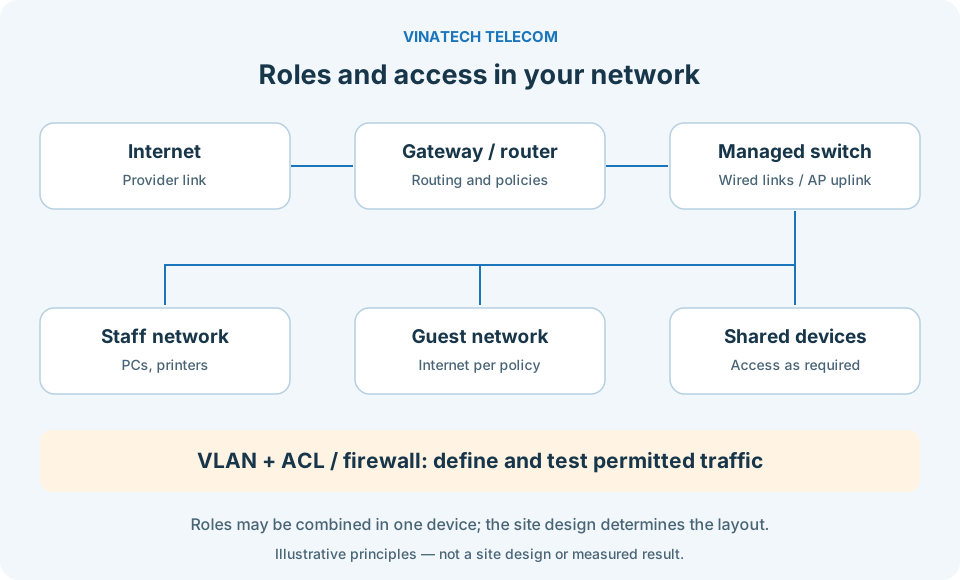
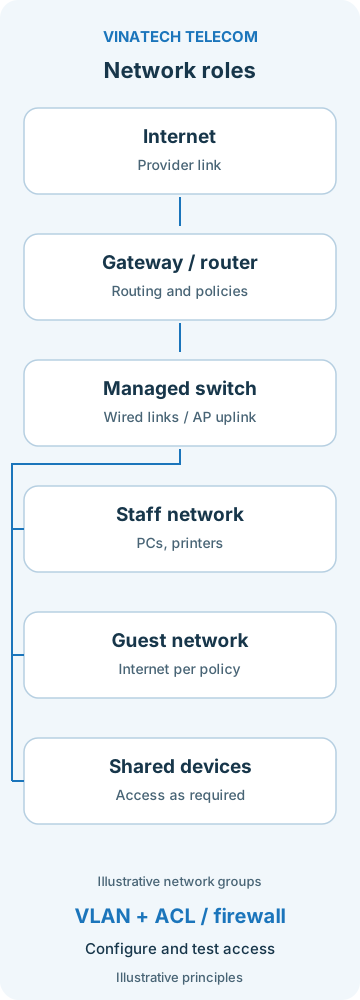
Scale and operational needs determine the layout. A small office does not automatically need a three-tier architecture. Roles may be combined in one device or separated as the system grows.
| Component | Role | Checks |
|---|---|---|
| Gateway / router | Internet connectivity, routing and policy enforcement according to configuration. | Internet links, application load, processing capacity and resilience requirements. |
| Switches and cabling | Wired connections; PoE where supported by the model and configuration. | Ports, uplinks, per-port and total power budgets; cable routes, terminations and agreed measurements. |
| Access Points (APs) | WiFi connectivity for the area in use. | Placement, coverage, interference, load and client-device capabilities. |
A VLAN is not an absolute security guarantee. Where inter-VLAN routing is enabled, define permitted traffic with suitable ACL or firewall policies and test the resulting access. Clarify what guests may use, which resources staff may access and where shared devices need to connect.
Select cabling and power for the required link, route length, installation environment and equipment documentation. A Cat5e or Cat6 label alone does not establish that all cabling must be replaced; check its condition and ability to meet requirements.
3. Verify with your actual applications and devices
Agree on acceptance criteria before deployment. Depending on scope, checks may include:
- Connectivity: measure in required areas and run applications on representative devices.
- Load: test the agreed device count and usage scenarios, recording the test conditions.
- Access: confirm that guest traffic cannot reach prohibited internal resources, and verify permitted connections too.
- WiFi roaming: test calls or applications while moving if this is required. Results depend on the client, AP and configuration; uninterrupted roaming cannot be promised for every device.
- Backup Internet: if included, test link switchover and record application impact. Do not assume a fixed failover time.
Handover documentation should clarify topology, cable labels, configurations, administrative access and the checks performed. It supports day-to-day operation, troubleshooting and future expansion.
4. Plan upgrades around your working day
For an operational system, agree on the change window, possible interruptions, configuration backups and a rollback plan if checks fail. Work may be phased by area or stage where the site and operational requirements allow.
Separate equipment, materials, installation, configuration and support costs. Models, accessories, licenses, availability, warranty and response arrangements are confirmed in the proposal or agreement; service packages do not automatically share the same terms.